 Serv-Minecraft
Plan and subscription
Managed from your server's Console tab, Abonnement (subscription) card. 5 answers, updated October 5, 2026.
Key questions 1
Renewing my subscription
Console tab, Abonnement (subscription) card: click Renouveler maintenant (renew now), choose the duration, then pay.
Console: in the Abonnement card, click Renouveler maintenant (renew now), or + Ajouter du temps (add time).
Choose the Durée (duration): the total including VAT, the monthly price and the new expiry date are shown before you pay.
Pay the invoice. The expiry date moves forward as soon as the payment is received.
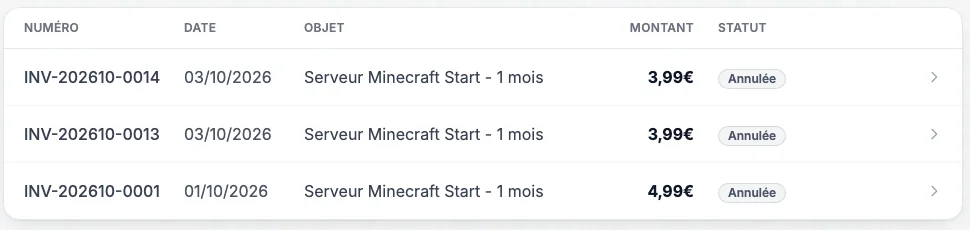
Factures page of the client area: number, date, item, amount and status of each invoice
To stop thinking about it, see auto-renewal.
Tutorials 4
Turn auto-renewal on or off
The Renouvellement auto (auto-renewal) switch, in the Abonnement card of the Console tab.
Console: in the Abonnement card, the Renouvellement auto switch shows Activé (on) or Désactivé (off).
On: a few days before the due date, the renewal is charged to your saved payment method. If the charge fails, the invoice waits for you in Factures.
Off: the server stops on its expiry date unless you renew it. An Expiration proche (expiring soon) banner warns you a few days before.
To stop your server at the end of the paid period, just turn the switch off: see stop my subscription.
Change plan
Console tab, Changer d'offre (change plan): you only pay the difference until the due date. For a smaller plan, contact support.
Console: below the Abonnement card, open Changer d'offre. Only plans with more memory are offered.
Pick the plan: you pay the difference until your due date, and the new price applies from the next renewal.
Once paid, memory and CPU are raised: restart the server to benefit from them.
To downgrade: this isn't available in the panel, write to support.
Your files, world and backups are kept.
Rename my server
Paramètres (Settings) tab, Nom du serveur card: Renommer (rename) button.
Paramètres (Settings): in the Nom du serveur (server name) card, click Renommer.
Type the new name: 4 to 20 characters (letters, digits, spaces, hyphens), then confirm.
This name identifies the server in your client area. It changes neither the connection address nor the name shown in the in-game server list: that one is the MOTD on Java (see edit server.properties) or the Nom du serveur field of the Paramètres tab on Bedrock.
Stop my subscription, get a refund
There is no cancel button: turn off Renouvellement auto and the server stops at the end of the paid period. Remaining time isn't refunded.
Console: in the Abonnement card, turn off Renouvellement auto.
The server stays usable until its expiry date, then stops with no new charge.
Before that date, download your backups if you want to keep your world (see backups).
Under the terms of sale, no prorated refund is made for the period already paid. Changed your mind? Turn the switch back on, or click Renouveler maintenant before expiry.
No answer here. Try the help center home or open a ticket.