 Serv-Minecraft
Troubleshooting and performance
Managed from the Serv-Minecraft client area. 8 answers, updated October 5, 2026.
Tutorials 1
Set the startup command (Java)
Avancé tab (Advanced), Commande de démarrage card: pick one of the three presets. The Java setting is already sized to your plan's memory.
Avancé tab, Commande de démarrage card (startup command): Réglage actuel shows the current preset.
Pick Optimisé (optimized) for a vanilla or plugin server, Modpack for a heavy modded server.
Restart the server from the Console: the change applies at the next startup.
Common errors
- The server fails to start after a preset change: pick Retour à la base (back to the original command), then restart.
The command can't be edited by hand: no need to touch the memory, it follows your plan.
Common problems 7
The server won't start
The console almost always shows the cause right before the server stops: read the last lines before looking any further.
Console tab (the panel is in French): restart the server and read the last lines before it stops.
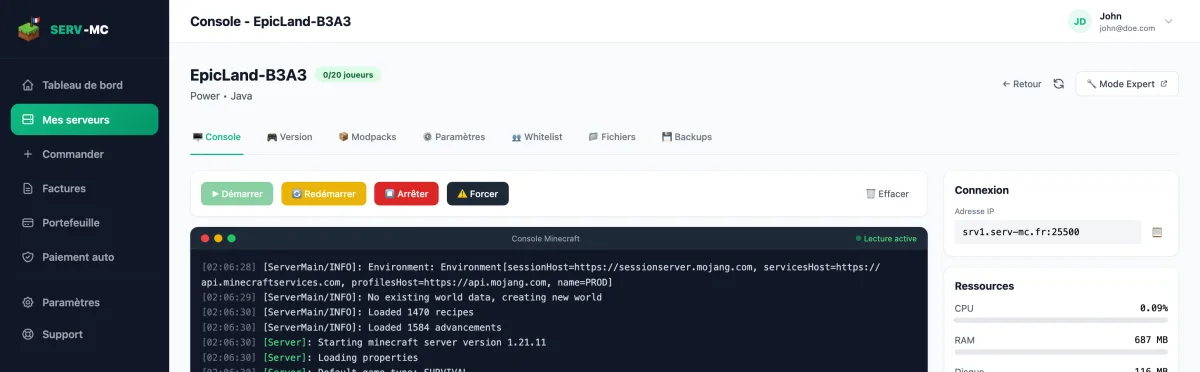
Panel Console tab: the last lines before the shutdown An
ExceptionorErrornaming a mod or plugin: see the server crashes because of a mod.A memory-related message (
OutOfMemoryError,java.lang.OutOfMemoryError): see out of memory.You need to agree to the EULA: in the Fichiers (Files) tab, openeula.txt, replacefalsewithtrue, save and restart.The server stops right after a version change: make a backup, then run the install again from the Version tab with Formater le serveur (format the server) checked. Careful: this box deletes all the server's files.
If nothing is clear, back up (see backups) then contact support with the last lines of the console attached.
The server crashes because of a mod
The console names the mod or plugin responsible right before the server stops: remove it and restart to confirm.
Console tab: find the name of the mod or plugin mentioned in the error (right before the server stops).
Fichiers (Files) tab: rename its
.jarfile inmodsorplugins(for example, add.disabledat the end) to exclude it without losing it.Restart. If the server starts, the mod or plugin you removed was indeed the cause.
Check its version: it must exactly match your server version and the loader you have installed (Fabric, Forge, NeoForge).
Common errors
- A client-only mod (shaders, minimaps, menus) installed on the server by mistake: remove it, it has no business being there. See add mods manually.
- Two mods that change the same mechanic (two engine optimization mods, for example) can conflict with each other with no clear error message: remove them one at a time.
The server runs out of memory (RAM full)
An OutOfMemoryError message, or a server that becomes unplayable for no clear reason, points to memory that's too tight for what you've installed.
Cut down whatever uses the most: number of mods or plugins installed, render distance, number of players online at once.
On a modded server, pick the Modpack preset in the startup command: the Java setting is already sized to your plan's memory.
If the server is still at its limit once everything is well tuned (a big modpack, lots of players), move up to the next plan: more RAM fixes this directly.
If the problem persists after these checks, contact support.
The server lags
Lower the render distance and simulation distance in the Paramètres tab, then find what's using resources with a profiler if the lag continues.
Paramètres tab (Settings): reduce Distance de rendu (render distance,
view-distance) and Distance de simulation (simulation-distance), for example to 8 and 6, then Enregistrer (save).On Paper, Spigot, or Purpur: install the Spark plugin, run
/spark profiler start, let it run for a few minutes while playing, then/spark profiler stopto see what's using the most resources (a plugin, an entity, a structure).Remove or reconfigure whatever the profile flags as expensive.
If the world is heavily explored and keeps generating new chunks, see the server maxes out the CPU.
Common errors
- Mixing up network lag (high ping, jerky movement for a single player) with server lag (low TPS, everyone affected): only the second one is fixed by these settings.
A modded server maxes out the CPU
Lower the render and simulation distance, pre-generate the world with Chunky to avoid on-the-fly generation, and remove client-only mods from the mods folder.
Before you start
A Fabric, Forge, or NeoForge server (modpack).
Paramètres tab (Settings): set Distance de rendu to 10 and Distance de simulation to 8, a good compromise on a modded server, then Enregistrer.
Install the Chunky mod (compatible with your loader), then in console or in game:
console> chunky radius 3000> chunky startLet pre-generation finish outside of play hours: it stops the CPU from generating new chunks in the middle of a session.
Fichiers tab,
modsfolder: remove client-only mods (Sodium, Iris, entityculling, and other visual optimization mods) if a modpack included them on the server by mistake. See add mods manually.
Common errors
- Running
chunky startwith a huge radius on a small server can take several hours: start with a smaller radius if you're not sure.
Expert Mode or SFTP refuses my login
Mode Expert (Expert Mode) and SFTP have their own password, different from your account password. A refused login almost always comes from that.
The password is set on your account's Paramètres page (not the server's), Mode Expert card.
Forgot it? Click Changer ce mot de passe (change this password) and pick a new one: see forgot your Expert Mode password.
For SFTP, copy the host, port and username again from the Avancé tab, Accès SFTP card > Voir les identifiants (view credentials): they may differ from an old note.
Still stuck: contact support and say which tool you use (Mode Expert, FileZilla, WinSCP).
My modpack is stuck on Installing
The status shows "Installation..." then, if it fails, "Installation échouée" (installation failed). A big modpack can stay on "Installation..." for several minutes, that's normal.
A lingering Installation... status is normal for a big modpack (several hundred mods): give it a few minutes before worrying.
If the status changes to Installation échouée: go back to the Modpacks tab, pick the pack and its version again, then click Installer le modpack (install the modpack).
Still failing: check that the modpack version you picked actually exists for that loader, some packs don't publish a server version for every client version.
Still stuck, contact support with the exact name and version of the modpack.
No answer here. Try the help center home or open a ticket.